Drag, resize, share
Arrange tiles on a grid, share with one workspace, or copy a shared dashboard to make it your own.

Governed AI for enterprise data
Kenvia gives everyone plain-English answers drawn from your ERP, databases, SaaS apps and documents, keeps them on live dashboards, and watches your commitments for you. Your access rules are enforced in code, every question is audited, and it runs on your servers or in your cloud.
Which of our top-20 customers have overdue invoices and open P1 tickets?
6 of your top-20 customers have overdue invoices and open P1 tickets, with $1,841,000 overdue in total.
| Customer | Overdue | Days | P1s |
|---|---|---|---|
| Halvorsen Pumps | $612,400 | 47 | 3 |
| Caldera Foods | $418,900 | 33 | 2 |
| Westmark Logistics | $296,150 | 61 | 1 |
Sources: JD Edwards receivables · ServiceNow incidents · SharePoint contracts
Kenvia at a glance
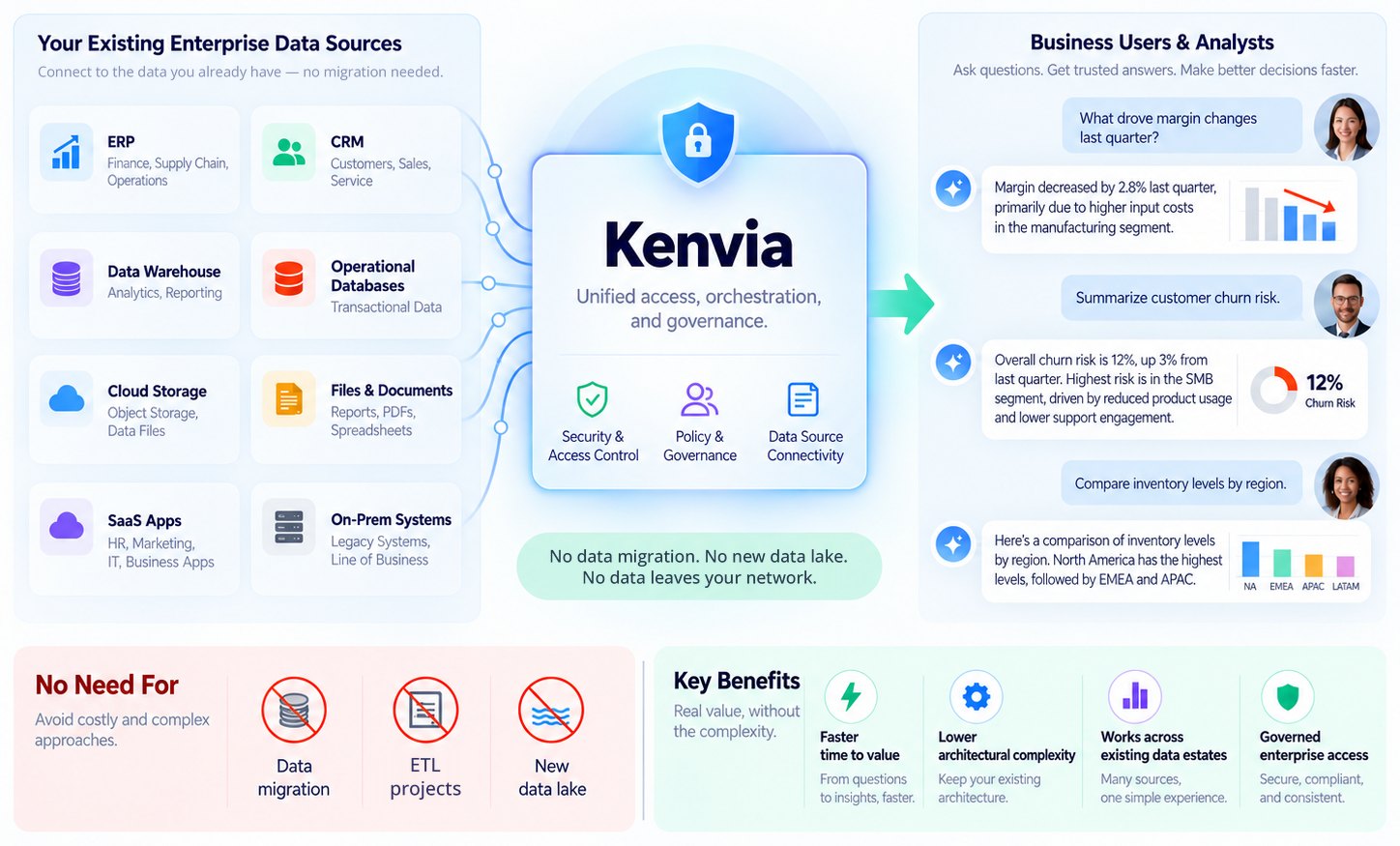
Kenvia connects to the systems you already run, applies your security and governance rules, and gives business users and analysts trusted answers in plain English.
See Kenvia in action
Short recordings of Kenvia itself, with the fictional demo data we use for demos: the menus, answers and figures are exactly what Kenvia shows.
Ana, a controller, asks which top customers are both overdue and waiting on urgent support. Kenvia queries JD Edwards and ServiceNow, joins the results, applies her rules and answers in plain English, with the e-mail column masked because her role may not see it.
The Finance weekly dashboard opens with every tile up to date. Then Raj, who may see only one company, signs in: the same tiles re-run under his rules and show only his rows, and the contract tile hides figures he is not allowed to see.
A tree-trimming contract promises at least 60 work orders a quarter in the Pine Ridge region. Watch quotes the clause, checks it on the work-order system, shows eight quarters against the limit and keeps the history: approved, checked, alerted.
Ask for the next six months of sales. Kenvia tests several methods on recent history, picks the most accurate and shows the range and how far off it was, instead of a single confident number.
When a source is connected, Kenvia finds names, e-mail addresses, phone numbers and IDs and masks them for everyone without permission. Admins see every rule in one place and can change who sees the real value.
Admins see who asked what, the exact query that ran, the rules applied, the model and how long it took. A request to delete data was refused before it reached the database, and the tamper check confirms nothing has been altered.
Recorded in Kenvia 0.6 with fictional demo data: every company, person and figure shown is invented. The demo runs offline, so its answers are written by Kenvia's built-in demo writer rather than an AI model.
Dashboards
Add any answer to a dashboard as a chart, a number or a table. Share it with a team, and every person who opens it sees their own data, under their own rules.
Arrange tiles on a grid, share with one workspace, or copy a shared dashboard to make it your own.
On request, the AI model writes two or three sentences from the numbers you see, never from masked values.
Put a commitment's status next to the numbers behind it.
Each tile run is on the record under the viewer's name, with the queries as they ran for them.
Kenvia Watch
Contracts, regulatory orders and policies are full of promises: delivery targets, service levels, payment terms. Watch turns each one into a check on your live data, and tells the right people when it slips.
Tree-trimming work orders at least 60 a quarter: 64 this quarter.
Days sales outstanding, Germany at most 55 days: 53 days and rising.
Supplier on-time in-full at least 95% a month: 92.4% in October.
Illustrative examples with fictional data.
The problem
Every important question crosses systems, and every crossing costs time and trust.
ERP, CRM, service desk, spreadsheets and contracts. No single tool sees all of it.
Questions queue behind a small analyst or IT team, and answers arrive after the moment has passed.
Exports spread customer and salary data, with no record of who saw what.
Pasting company data into public chatbots skips your access rules and leaves no audit trail.
How it works
The AI proposes. Kenvia's policy engine decides. Nothing runs until your rules are applied.
Maps your words to approved business definitions.
Picks the systems and steps needed to answer.
Adds row and column rules in code and masks personal data.
Read-only, inside your network, with row and time limits.
Summary, chart and table, with every source cited.
Recorded for audit at every step: who asked, what ran, what came back, which policies applied and which AI model was used.
Connectors
34 read-only connectors, set up in the browser with no code. No data warehouse project required first.
PostgreSQL · SQL Server · Oracle · MySQL · other SQL databases · MongoDB · Azure Cosmos DB
Snowflake · BigQuery · Redshift · Databricks · Microsoft Fabric
JD Edwards · Oracle E-Business Suite · NetSuite · Workday · SAP, through a copy in your warehouse or Fabric
Salesforce · HubSpot · ServiceNow · Zendesk
Amazon S3 · Azure Blob · Google Cloud Storage · OCI Object Storage · server folders
SharePoint · OneDrive · Confluence · Google Drive · Box · Dropbox · document folders
Any REST API, or your own MCP server
Live query · snapshots kept inside your network · indexed documents
ERP knowledge packs
Built-in packs for JD Edwards, Oracle EBS, NetSuite, Workday and SAP translate cryptic tables into business language. They query the live ERP database directly or, for SAP, the copy in your warehouse or Microsoft Fabric.
F03B11.RPAAPOpen invoice amount1262741 October 20266124000$61,240.00Automatic learning
Add a source with a read-only account. Kenvia lists its tables.
Reads a small sample of each table to understand what it holds.
Finds e-mails, phone numbers, IDs and salaries, and masks them automatically.
Proposes business terms such as “overdue invoice”. They are used only after an admin approves them.
Security and governance
Your rules live in deterministic code, not in a prompt, so they cannot be talked around. Anything the policy engine cannot verify is refused, not guessed.
People see only their companies, regions or business units.
Mask, hash or block columns before the AI sees any data.
A single SELECT per step. Risky database functions are refused.
Only the tables you put in scope. System catalogs never.
Entra ID, Okta, Ping, Keycloak or any OpenID Connect provider. Roles and row access come from it; people without a role are refused.
Row limits and timeouts on every query engine.
| Person | Rule applied | Customers | Overdue | Contact e-mail |
|---|---|---|---|---|
| PriyaAdministrator | Full access | 6 | $1,841,000 | Visible |
| AnaController, Finance | Personal data masked | 6 | $1,841,000 | •••• masked |
| RajSales operations | One company only, masked | 4 | $1,180,800 | •••• masked |
Illustrative example with fictional data.
Audit
AI model choice
Claude · Azure OpenAI in your subscription · Amazon Bedrock in your account · OpenAI · self-hosted open models
The question, table and column names, approved definitions, and at most 50 masked rows per step.
Database credentials, whole tables, or masked and blocked values. You can also send it no rows at all.
Deployment
One container image, run by you. Your business data never passes through Kenvia's servers.
HTTPS, metadata database, backups and upgrades included. An offline bundle is available for isolated networks.
Sign in with Entra ID, Okta, Ping, Keycloak or any OpenID Connect provider. Roles and data access follow your existing groups.
Health checks, metrics, nightly backups and one-command upgrades.
Use cases
“Which invoices are more than 60 days overdue, and do their contracts allow late fees?”
“What is our DSO by region this quarter?”
“Which open orders are past their promise date, by plant?”
“Which suppliers delivered late most often this year?”
“Who are our top 10 customers this year, compared with last year?”
“Which open opportunities belong to customers with unpaid invoices?”
“Which accounts have open P1 incidents right now?”
“What is headcount by department, and how many requisitions are open?”
Start with a pilot
A fixed-scope pilot on your own systems, with success criteria agreed before we start.
Install in your environment, connect three sources, and complete a security review with your team.
Approve the business glossary and agree 50 test questions with your teams.
20 to 50 people ask real questions, with a weekly progress report.
Pricing
One monthly fee per plan, with users and connected systems included. Grow past your plan at a fixed price per extra user or system, or move up a plan.
$6,300/month
$252 per user, per month
Talk to us$11,500/month
$230 per user, per month
Talk to us$21,000/month
$210 per user, per month
Talk to usLet's talkPriced for your rollout
For enterprise-wide rollouts, in your cloud, your data center or air-gapped
Contact usPrices in US dollars per month. A connected system is one data source, such as an ERP database or a CRM; document libraries are included free. Grow as you need: add a connected system for $1,500 a month or another user for $50 a month, any time. Your servers and AI model usage are billed by your own providers. Start with a 60-day pilot on your data before you choose a plan.
FAQ
No. Kenvia runs inside your network or cloud account. The only outbound call is to the AI model you choose, which receives table names, approved definitions and a small masked sample, or no rows at all. You can also use a self-hosted model so nothing leaves your environment.
No. Kenvia connects with read-only accounts you create, and its policy engine allows only a single SELECT query per step. Anything else is refused before it reaches your systems.
Encrypted in your Kenvia database, inside your environment, with keys you can rotate. Credentials are never sent to the AI model.
Roles and row access come from your identity provider (Entra ID, Okta, Ping, Keycloak or another OpenID Connect provider). Row and column rules are applied in code to every query, so two people asking the same question can get different, correct answers.
Remove them from the group in your identity provider. Access is re-checked on every request, and an administrator can sign a person out everywhere with one click.
Kenvia is an early-stage product. A third-party penetration test is completed before any production rollout, SOC 2 is on our roadmap, and our security pack is available on request.
No. Kenvia complements them. BI dashboards answer the questions you planned for; Kenvia answers the ones you didn't, across systems, and keeps the answers you need every week on a governed dashboard without building a new report.
No. A dashboard tile re-runs the governed queries behind the answer it came from, and a watch runs the query a person approved. Neither calls the AI model, so a model outage or change cannot alter a figure. The model is used only when someone asks a new question or requests a summary of a tile.
Request a demo
In 30 minutes we'll show Kenvia answering questions across ERP and service data, the same question as three different people, a live database connection, and the audit trail.
Prefer e-mail? hello@kenvia.ai